CMMS Software – Reduce Downtime by 40% & Cut Maintenance Costs
E-Asset Care is the complete Computerized Maintenance Management System trusted by 2 organizations worldwide. Streamline asset tracking, preventive maintenance, work orders, and inventory management in one powerful platform.
⭐ Rated 4.8/5 by 11+ users | ✓ No Credit Card Required
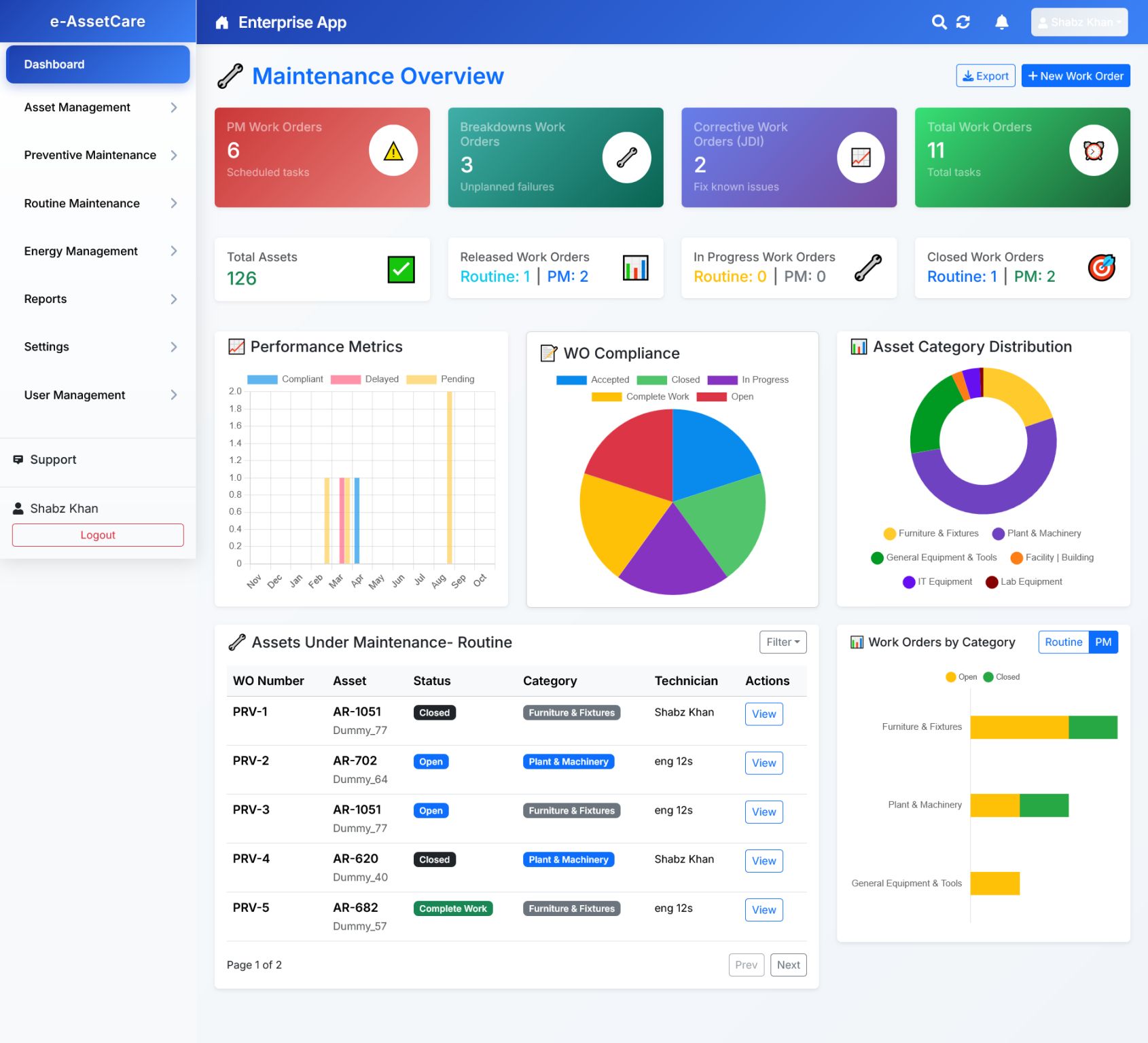
What Is CMMS Software? Complete Guide to Maintenance Management Systems
CMMS (Computerized Maintenance Management System) is a digital software solution that centralizes maintenance information and facilitates the processes of maintenance operations. It helps organizations track assets, schedule preventive maintenance, manage work orders, control inventory, and generate reports for data-driven decision making.
In today's industrial landscape, reactive maintenance (fixing things when they break) is no longer sufficient. Modern organizations need proactive maintenance strategies supported by powerful software. A CMMS acts as the nerve center of your maintenance operations, providing real-time visibility into asset health, maintenance activities, and resource allocation.
💡 Quick Definition
A CMMS is essentially a digital hub that stores information about your assets and equipment, helps you plan and track maintenance activities, manages spare parts inventory, and provides insights through analytics and reporting. Think of it as your maintenance department's operating system.
The Evolution of Maintenance Management
Manual logs, clipboards, filing cabinets
Mainframe systems, limited functionality
Windows-based applications, on-premise servers
Mobile apps, IoT integration, AI-powered analytics
Core Components of a Modern CMMS
Asset Management
Complete lifecycle tracking from acquisition to disposal, including location, specifications, documentation, and depreciation.
Work Order Management
Create, assign, track, and close work orders with detailed labor, parts, and cost tracking.
Preventive Maintenance
Automated scheduling based on time, usage, or condition triggers to prevent breakdowns.
Inventory Management
Track spare parts, supplies, and materials with automated reorder points and vendor management.
Reporting & Analytics
Real-time dashboards, KPI tracking, and customizable reports for informed decision-making.
User Management
Role-based access control, technician scheduling, and mobile accessibility.
Powerful Features of E-Asset Care CMMS Software
E-Asset Care delivers enterprise-grade maintenance management capabilities with an intuitive interface that requires minimal training. Here's what makes our CMMS software the preferred choice for organizations worldwide.
🏭 Comprehensive Asset & Equipment Management
Maintain a complete digital record of every asset in your organization. Track serial numbers, specifications, warranty information, purchase dates, maintenance history, and current location. Our asset register supports hierarchical structures (facility → department → equipment → component) and unlimited custom fields.
- Unlimited asset records with photo uploads
- QR code and barcode scanning for instant identification
- Asset depreciation calculations (straight-line, declining balance)
- Warranty and contract expiration alerts
- Parent-child asset relationships and bill of materials
- Real-time asset location tracking with GPS integration
🔧 Intelligent Work Order Management System
Transform maintenance chaos into organized workflows. Create work orders from scratch, from PM schedules, or from requests. Auto-assign based on technician skills, availability, and workload. Track every minute of labor and every dollar spent with precision.
- Priority-based work order queues (Emergency, High, Medium, Low)
- Mobile work order completion with offline capability
- Before/after photo documentation
- Digital checklists and safety procedures
- Time tracking with start/stop timers
- Parts usage logging and cost allocation
- Approval workflows for high-cost repairs
- Recurring work order templates
📅 Automated Preventive Maintenance Scheduling
Shift from reactive to proactive maintenance. Set up PM schedules based on calendar dates, meter readings, or conditional triggers. Auto-generate work orders and send notifications to the right people at the right time. Our PM scheduler has prevented thousands of unexpected breakdowns for our clients.
- Time-based triggers (daily, weekly, monthly, yearly)
- Meter-based triggers (hours, miles, cycles, production units)
- Condition-based triggers (sensor readings, vibration analysis)
- Customizable maintenance checklists and procedures
- Technician assignment rules and rotation schedules
- PM compliance tracking and missed PM alerts
- Seasonal adjustment for time-based schedules
📦 Smart Inventory & Spare Parts Management
Never run out of critical parts again. Track quantities, locations, costs, and reorder points. Link parts to specific equipment and work orders. Generate purchase requisitions automatically when inventory falls below minimum levels. Manage multiple warehouses and stockrooms with ease.
- Real-time inventory levels across all locations
- Automated reorder point notifications
- Multi-location inventory with transfer tracking
- Vendor management with lead time tracking
- Purchase order generation and receiving
- FIFO/LIFO inventory valuation methods
- Parts usage history and cost analysis
- Integration with barcode scanners for accurate counting
📊 Advanced Reporting & Business Intelligence
Make data-driven decisions with powerful analytics. Access 50+ pre-built reports covering all aspects of maintenance operations. Create custom reports with our drag-and-drop report builder. Schedule automatic report delivery to stakeholders. Export to Excel, PDF, or integrate with your BI tools.
- Real-time KPI dashboards (MTBF, MTTR, OEE, availability)
- Asset performance and failure analysis
- Maintenance cost tracking and budget variance
- Technician productivity and workload reports
- PM compliance and completion rates
- Inventory turnover and carrying costs
- Scheduled report delivery via email
- Custom report builder with no coding required
📱 Mobile CMMS Apps for iOS & Android
Empower your technicians with mobile access. Complete work orders, update asset information, request parts, and capture photos from anywhere. Works offline and syncs when connection is restored. Available for smartphones and tablets.
- Offline mode for areas without connectivity
- Barcode/QR code scanning with device camera
- Photo and video capture for documentation
- Digital signature capture for approvals
- GPS location stamping for work completed
- Push notifications for new assignments
🔗 Seamless System Integrations
Connect E-Asset Care with your existing business systems. We offer pre-built integrations and a robust API for custom connections. Sync asset data with your ERP, receive IoT sensor data, push transactions to accounting software, and more.
- ERP integration (SAP, Oracle, Microsoft Dynamics)
- IoT platform connectivity for predictive maintenance
- Accounting software sync (QuickBooks, Xero)
- Active Directory/LDAP for user authentication
- RESTful API with comprehensive documentation
- Webhook support for real-time event notifications
🔒 Enterprise Security & Compliance
Your data security is our top priority. E-Asset Care includes role-based access control, audit trails, data encryption, and compliance support for industry regulations including ISO 55000, GMP, FDA 21 CFR Part 11, and OSHA requirements.
- Role-based permissions with custom access levels
- Complete audit trail of all system changes
- Data encryption at rest and in transit (AES-256, TLS 1.3)
- Automatic daily backups with point-in-time recovery
- Compliance reporting for regulatory audits
- Single Sign-On (SSO) support
- SOC 2 Type II certified infrastructure
See E-Asset Care in Action
Schedule a personalized demo and discover how our CMMS can transform your maintenance operations.
Book Your Free DemoProven Benefits & ROI of CMMS Software Implementation
Organizations that implement E-Asset Care CMMS see measurable improvements within the first 6 months. Here's what our clients achieve:
40% Reduction in Equipment Downtime
Preventive maintenance catches issues before they cause failures. Our clients report average downtime reductions of 40%, with some achieving 60% improvements. This means more production time, higher output, and better customer service.
30% Lower Maintenance Costs
Eliminate waste from emergency repairs, overtime labor, expedited parts shipping, and secondary damage. Better planning means better budgeting and predictable expenses. Most organizations achieve full ROI within 12-18 months.
20-25% Extended Asset Lifespan
Proper maintenance extends the life of equipment. Regular servicing, timely repairs, and detailed maintenance records help assets last years longer than industry averages.
35% Increase in Technician Productivity
Mobile access, organized work queues, and instant parts availability eliminate wasted time. Technicians spend more time fixing equipment and less time searching for information.
50% Reduction in Paperwork
Digital work orders, electronic approvals, and automated reporting eliminate paper forms, clipboards, and filing cabinets. Save time and reduce errors from manual data entry.
100% Compliance Readiness
Maintain audit-ready records for regulatory compliance. Track calibrations, inspections, training, and certifications. Generate compliance reports in minutes, not days.
Real-Time Visibility & Control
Know the status of every asset, work order, and technician at any moment. Make informed decisions based on real data, not guesswork or outdated spreadsheets.
Better Resource Planning
Forecast maintenance needs, budget accurately, and optimize staffing levels. Know when to hire, when to use contractors, and how to balance workloads.
Calculate Your Potential ROI
Based on industry benchmarks and client data, here's what a typical organization can expect:
| Benefit Category | Typical Annual Savings | Implementation Period |
|---|---|---|
| Reduced Downtime | $50,000 - $200,000 | 3-6 months |
| Lower Emergency Repairs | $25,000 - $100,000 | 6-12 months |
| Optimized Inventory | $15,000 - $50,000 | 6-9 months |
| Labor Efficiency | $30,000 - $75,000 | 3-6 months |
| Extended Asset Life | $20,000 - $80,000 | 12-24 months |
| Total Potential Savings | $140,000 - $505,000 | First Year |
*Actual results vary by industry, organization size, and current maintenance maturity level. Request a custom ROI analysis based on your specific situation.
Get Custom ROI AnalysisHow Does CMMS Software Work? A Step-by-Step Guide
Understanding how CMMS software works helps you maximize its value. Here's the complete workflow from asset registration to performance analysis:
Asset & Equipment Registration
Start by creating a digital inventory of all your assets. For each piece of equipment, enter identifying information (serial number, model, location), specifications, purchase details, and upload photos or documents. Assign QR codes or barcodes for easy scanning.
Create Preventive Maintenance Schedules
Set up PM schedules based on manufacturer recommendations and your operational needs. Define trigger criteria (every 30 days, every 1000 miles, when temperature exceeds 180°F), create checklists, estimate time requirements, and assign parts.
Automatic Work Order Generation
When PM schedule triggers are met, the CMMS automatically creates work orders with all necessary information. Work orders can also be created manually for corrective maintenance, inspections, or emergency repairs. Each work order includes priority level, detailed description, required parts, estimated duration, and assigned technician.
Technician Receives & Executes Work
Technicians receive notifications on their mobile device or see work orders in their queue. They view all relevant information, access asset history, check parts availability, and follow safety procedures. During execution, they log time, record findings, take photos, and note any issues discovered.
Parts & Inventory Management
When technicians use parts, the system automatically updates inventory levels. If a part reaches its reorder point, the system alerts purchasing staff or can automatically generate a purchase requisition. All parts usage is tracked by asset, cost center, and work order.
Work Order Completion & Review
After finishing the work, technicians close the work order with completion notes. Supervisors can review and approve high-cost repairs. The system records all labor hours, parts costs, and contractor expenses. Asset maintenance history is automatically updated.
Data Analysis & Continuous Improvement
Managers review dashboards and reports to identify trends, problem assets, cost drivers, and improvement opportunities. Use data to optimize PM schedules, make repair vs. replace decisions, negotiate better supplier contracts, and justify equipment investments.
🔄 The Continuous Improvement Cycle
CMMS isn't a one-time setup—it's a continuous improvement tool. As you collect more data, you can refine PM schedules, adjust staffing levels, optimize inventory, and make better strategic decisions. Organizations typically see ongoing improvements for 2-3 years after initial implementation as they mature their maintenance practices.
Industries That Benefit from CMMS Software
E-Asset Care CMMS serves organizations across diverse industries. Here's how different sectors use our maintenance management solution:
Manufacturing & Production
Track production equipment, CNC machines, robotics, conveyor systems, and utilities. Minimize downtime, optimize OEE, and maintain quality standards. Support lean manufacturing and TPM initiatives.
Healthcare & Medical Facilities
Manage medical equipment, HVAC systems, emergency generators, and facility infrastructure. Track calibrations, certifications, and inspections. Maintain TJC and CMS compliance. Ensure critical equipment availability.
Facilities Management & Commercial Real Estate
Maintain buildings, HVAC, elevators, lighting, plumbing, and fire systems across multiple properties. Schedule janitorial services, landscaping, and seasonal maintenance. Manage tenant requests and contractor work.
Education & Universities
Manage campus facilities, classroom equipment, lab instruments, athletic facilities, and residence halls. Handle maintenance requests from faculty and students. Coordinate work during breaks and minimize disruption during term.
Logistics & Transportation
Track vehicle fleets, material handling equipment, warehouse systems, and loading docks. Schedule vehicle maintenance based on mileage or engine hours. Manage DOT compliance and inspection requirements.
Energy & Utilities
Maintain power generation equipment, transmission systems, substations, and distribution networks. Track transformer maintenance, vegetation management, and infrastructure inspections. Support reliability standards compliance.
Hospitality & Hotels
Manage guest rooms, kitchens, laundry equipment, pools, fitness centers, and common areas. Handle guest maintenance requests promptly. Schedule preventive maintenance to avoid guest disruption.
Food & Beverage Processing
Maintain processing equipment, refrigeration, packaging lines, and cleaning systems. Support HACCP compliance, track equipment sanitization, and manage FDA requirements. Prevent contamination risks.
Pharmaceutical & Biotech
Manage clean rooms, processing equipment, quality control instruments, and environmental controls. Track calibrations, validations, and qualifications. Support FDA 21 CFR Part 11 compliance and GMP requirements.
Government & Municipalities
Manage public works, parks, fleet vehicles, public buildings, and infrastructure. Track citizen service requests, coordinate contractor work, and manage capital projects. Support transparency and accountability requirements.
Not Sure If CMMS Is Right for Your Industry?
Talk to an expert about your specific needs and challenges.
Contact Our TeamCMMS vs EAM vs FSM: Understanding the Differences
Confused about maintenance software categories? Here's a clear comparison to help you choose the right solution for your needs.
| Feature / Capability | CMMS (Computerized Maintenance Management System) |
EAM (Enterprise Asset Management) |
FSM (Field Service Management) |
|---|---|---|---|
| Primary Focus | Maintenance operations and work order management | Complete asset lifecycle from acquisition to disposal | Mobile workforce and customer service management |
| Best For | Internal maintenance departments, facilities, manufacturing plants | Large enterprises with complex asset portfolios, utilities, infrastructure | Service companies with field technicians, HVAC, telecom, equipment rental |
| Work Order Management | ✅ Comprehensive | ✅ Comprehensive | ✅ Comprehensive |
| Preventive Maintenance | ✅ Core feature | ✅ Core feature | ⚠️ Basic |
| Asset Tracking | ✅ Detailed equipment records | ✅ Detailed + financial management | ⚠️ Basic |
| Inventory Management | ✅ Spare parts and materials | ✅ Comprehensive with procurement | ⚠️ Basic parts tracking |
| Financial Management | ⚠️ Cost tracking and reporting | ✅ Full accounting, depreciation, capital planning | ✅ Billing, invoicing, contracts |
| Mobile App | ✅ Technician access | ✅ Technician access | ✅ Advanced field technician features |
| Scheduling & Dispatch | ⚠️ Basic assignment | ⚠️ Basic assignment | ✅ Advanced with GPS routing and optimization |
| Customer Portal | ❌ Not typically included | ❌ Not typically included | ✅ Customer portals and notifications |
| Risk Management | ⚠️ Basic safety tracking | ✅ Comprehensive risk and compliance | ❌ Limited |
| Contract Management | ⚠️ Basic vendor tracking | ✅ Comprehensive warranty and contract management | ✅ Service contracts and SLAs |
| Typical Implementation Time | 4-12 weeks | 3-9 months | 6-16 weeks |
| Typical Cost Range | $40-$80/user/month | $80-$200/user/month | $50-$120/user/month |
| Organization Size | Small to Large (5-1,000+ users) | Medium to Enterprise (50-10,000+ users) | Small to Large (5-500+ users) |
Which Solution Do You Need?
Choose CMMS If You:
- Focus on internal maintenance operations
- Need to reduce equipment downtime
- Want to implement preventive maintenance
- Manage facilities, plants, or equipment
- Need a quick, cost-effective solution
- Have 5-500 assets to maintain
E-Asset Care is a comprehensive CMMS solution perfect for most organizations.
Choose EAM If You:
- Are a large enterprise or utility
- Need complete asset lifecycle management
- Require detailed financial tracking and depreciation
- Must manage capital planning and budgets
- Have complex regulatory compliance needs
- Manage 1,000+ high-value assets
Choose FSM If You:
- Provide services at customer locations
- Need advanced scheduling and routing
- Manage field technicians and service calls
- Bill customers for labor and parts
- Need customer portals and communication
- Operate as a service business
💡 Good News: Many Features Overlap
Modern CMMS solutions like E-Asset Care include many EAM and FSM capabilities. You don't always need separate systems. We can help you determine if CMMS meets all your needs or if you should consider a hybrid approach.
CMMS Implementation: Your Complete Step-by-Step Guide
Successful CMMS implementation requires planning and execution. Here's our proven methodology that has helped 500+ organizations go live on time and on budget.
Planning & Assessment (Week 1-2)
Key Activities:
- Define goals and success metrics (reduce downtime by X%, improve PM compliance to Y%)
- Identify stakeholders and form project team
- Document current maintenance processes and pain points
- Determine scope: which assets, locations, departments to include
- Review existing data in spreadsheets, paper files, legacy systems
- Create project timeline and resource plan
Deliverables:
- Project charter and implementation plan
- Stakeholder communication plan
- Requirements document
System Configuration (Week 3-4)
Key Activities:
- Set up organizational structure (locations, departments, cost centers)
- Configure user roles and permissions
- Customize work order types, priority levels, and status options
- Set up categories for assets, failures, and parts
- Design forms, checklists, and reports
- Configure email notifications and alerts
- Establish naming conventions and standards
Deliverables:
- Configured CMMS system ready for data
- Configuration documentation
Data Migration (Week 4-6)
Key Activities:
- Clean and standardize existing asset data
- Import assets with specifications, locations, and photos
- Load parts inventory with quantities and vendors
- Create or import preventive maintenance schedules
- Set up vendor and contractor information
- Verify data accuracy and completeness
- Generate QR codes or barcodes for assets
Deliverables:
- Complete asset register in CMMS
- Parts inventory loaded and verified
- PM schedules configured and active
Training & Testing (Week 6-8)
Key Activities:
- Train administrators on system configuration and management
- Train supervisors on work order planning and reporting
- Train technicians on mobile app and work order execution
- Train purchasing staff on inventory and procurement
- Conduct hands-on practice sessions
- Test workflows with real scenarios
- Create quick reference guides and job aids
Deliverables:
- Trained user base ready for go-live
- Training materials and documentation
- Tested workflows and processes
Go-Live & Transition (Week 8-10)
Key Activities:
- Final data validation and system checks
- Cut over from old system to new CMMS
- Begin using CMMS for all maintenance activities
- Provide on-site or remote support during go-live
- Monitor adoption and address issues quickly
- Gather feedback from users
Deliverables:
- Live CMMS system in daily use
- Support schedule for first month
Optimization & Continuous Improvement (Ongoing)
Key Activities:
- Review adoption metrics and user engagement
- Refine PM schedules based on actual results
- Optimize inventory reorder points and quantities
- Customize reports for different stakeholder needs
- Analyze data to identify improvement opportunities
- Implement additional features and modules
- Conduct refresher training as needed
Deliverables:
- Continuously improving maintenance operations
- Regular performance reviews and reports
🎯 Critical Success Factors for CMMS Implementation
✅ Do This
- Get executive sponsorship and visible support
- Start with a pilot department or location
- Focus on quick wins in first 90 days
- Communicate frequently with all stakeholders
- Celebrate successes and recognize adopters
- Dedicate resources to the project
- Keep customizations simple initially
- Use vendor support and expertise
❌ Avoid This
- Trying to replicate old paper-based processes exactly
- Waiting for 100% perfect data before starting
- Implementing without adequate training
- Customizing too much before understanding the system
- Skipping stakeholder engagement
- Setting unrealistic timelines
- Treating implementation as IT project instead of business initiative
- Forgetting about change management
Need Implementation Support?
E-Asset Care offers complete implementation services including project management, data migration, customization, training, and go-live support. Our average implementation time is 8 weeks for organizations with under 500 assets, and 12-16 weeks for larger deployments.
Learn About Our Implementation ServicesCMMS Software Pricing: Plans & Investment Guide
Transparent pricing with no hidden fees. Choose the plan that fits your organization's size and needs.
Starter
Perfect for small teams
Includes:
- ✅ Up to 10 users
- ✅ Unlimited assets
- ✅ Work order management
- ✅ Preventive maintenance scheduling
- ✅ Mobile app (iOS & Android)
- ✅ Basic reporting
- ✅ Email support
- ✅ 5GB storage
Professional
For growing organizations
Everything in Starter, plus:
- ✅ Up to 50 users
- ✅ Inventory management
- ✅ Purchase order management
- ✅ Advanced reporting & dashboards
- ✅ Custom fields
- ✅ Asset hierarchy
- ✅ Document management
- ✅ Priority phone & email support
- ✅ 50GB storage
- ✅ API access
Enterprise
For large organizations
Everything in Professional, plus:
- ✅ Unlimited users
- ✅ Multiple locations/facilities
- ✅ Advanced analytics & KPIs
- ✅ Custom integrations
- ✅ Single Sign-On (SSO)
- ✅ Dedicated account manager
- ✅ Implementation services
- ✅ Priority 24/7 support
- ✅ Unlimited storage
- ✅ Custom SLA
- ✅ On-premise deployment option
Pricing Questions Answered
What's included in all plans?
All plans include core CMMS features: asset management, work orders, preventive maintenance, mobile apps, and regular software updates. Higher tiers add inventory, advanced reporting, and enterprise features.
Do you charge per asset or per user?
We charge per user, not per asset. Track unlimited assets regardless of your plan. This makes E-Asset Care more cost-effective as your asset count grows.
Is there a long-term contract?
No long-term contracts required. Month-to-month subscriptions are available. Annual plans receive 15-20% discount and are still cancellable with 30 days notice.
Are there implementation fees?
Starter and Professional plans include self-service setup at no extra cost. Enterprise implementations range from $5,000-$25,000 depending on complexity, data volume, and customization needs.
What about integrations?
Standard integrations (QuickBooks, common ERPs) are included in Professional and Enterprise plans. Custom integrations may have development fees depending on complexity.
Do you offer discounts?
Yes! We offer: 15% for annual pre-payment, volume discounts for 50+ users, non-profit organization discounts, and educational institution pricing. Contact sales for details.
Not Sure Which Plan Is Right?
Schedule a consultation with our team. We'll help you choose the best plan based on your needs and budget.
Talk to Sales Watch DemoCustomer Success Stories: Real Results from Real Organizations
See how organizations across industries use E-Asset Care CMMS to transform their maintenance operations.

Client Manufacturing
Automotive Parts Manufacturing | Phoenix, AZ
The Challenge
Client Manufacturing was experiencing 18-20 hours of unplanned downtime per week across their 45 CNC machines and assembly lines. Maintenance was entirely reactive using paper work orders. They had no visibility into maintenance costs or asset performance. Parts inventory was managed in Excel, leading to frequent stockouts and rush orders.
Client 2 Solution
Implemented E-Asset Care CMMS with focus on preventive maintenance scheduling, mobile work orders for 12 technicians, and integrated inventory management. Created PM schedules for all critical equipment based on manufacturer recommendations. Trained team in 8 weeks and went live with full system.
The Results (12 Months)
"E-Asset Care transformed our maintenance from chaotic firefighting to organized, proactive operations. The mobile app meant our technicians always had the information they needed at the machine. ROI was clear within 6 months."Maintenance Manager

Client 3 Healthcare System
Multi-Hospital Healthcare Network | CA
The Challenge
Managing medical equipment maintenance across 3 hospitals and 8 clinics was a compliance nightmare. No centralized system for tracking calibrations, inspections, or certifications. TJC audits were stressful. Equipment downtime affected patient care. Couldn't demonstrate PM completion for accreditation.
The Solution
Deployed E-Asset Care CMMS network-wide with emphasis on compliance tracking, automated PM scheduling, and comprehensive reporting. Integrated with existing asset tracking system. Created custom fields for regulatory requirements. Set up automatic notifications 60/30/7 days before due dates.
The Results (18 Months)
"The peace of mind during accreditation surveys is worth the investment alone. Everything we need to demonstrate compliance is instantly available. Our biomedical engineering team is more efficient and our equipment availability has improved significantly."VP of Operations

Client 4 Group
Commercial | Chicago, IL
The Challenge
Managing 23 commercial buildings (4.2M sq ft) with scattered maintenance operations. Each property manager used different systems (or none at all). No visibility into maintenance spending. Couldn't benchmark performance across properties. Tenant complaints about maintenance response times.
The Solution
Implemented enterprise E-Asset Care CMMS with multi-site capability. Standardized maintenance processes across all properties. Created tenant portal for maintenance requests. Integrated with accounting system for cost tracking. Deployed mobile app for 35 technicians and contractors.
The Results (24 Months)
"E-Asset Care gave us enterprise-level visibility and control over our maintenance operations. We can now benchmark properties, identify underperformers, and make data-driven decisions. The tenant portal has dramatically improved satisfaction."Property Operations
Want to Share Your Success Story?
Join 500+ organizations achieving measurable results with E-Asset Care CMMS.
Get Started TodayFrequently Asked Questions About CMMS Software
Got questions? We've got answers. Here are the most common questions about CMMS software and E-Asset Care.
What is CMMS software?
CMMS (Computerized Maintenance Management System) is software that centralizes maintenance information and facilitates maintenance operations. It helps organizations track assets, schedule preventive maintenance, manage work orders, control inventory, and generate reports for data-driven decision making. Modern CMMS systems like E-Asset Care are cloud-based with mobile apps, providing real-time access to maintenance data from anywhere.
How much does CMMS software cost?
CMMS software pricing typically ranges from $35-$150 per user per month, depending on features, deployment type (cloud vs on-premise), and organization size. E-Asset Care offers flexible pricing starting at $40/user/month for small teams, $65/user/month for growing organizations, and $95/user/month for enterprises, with volume discounts available. Most organizations achieve ROI within 12-18 months through reduced downtime, lower maintenance costs, and improved efficiency.
What are the key benefits of using CMMS software?
Key benefits include: 40% reduction in equipment downtime, 30% decrease in maintenance costs, 20-25% extended asset lifespan, 35% increase in technician productivity, improved regulatory compliance, better inventory control, data-driven decision making, and enhanced safety. Organizations also benefit from eliminating paper-based processes, improving response times, and gaining real-time visibility into maintenance operations.
How long does CMMS implementation take?
CMMS implementation typically takes 4-12 weeks depending on organization size and complexity. Small businesses with under 100 assets can go live in 2-4 weeks. Mid-size organizations with 100-500 assets typically need 6-8 weeks. Enterprise implementations with 500+ assets and multiple locations may take 3-6 months including data migration, customization, integration, and comprehensive training. E-Asset Care's implementation methodology ensures on-time, on-budget deployments.
Can CMMS software integrate with other systems?
Yes, modern CMMS software like E-Asset Care integrates with ERP systems (SAP, Oracle, Microsoft Dynamics), IoT sensors for condition monitoring, accounting software (QuickBooks, Xero), procurement systems, building management systems (BMS), and other business applications through APIs and standard integration protocols. These integrations enable automated data exchange, eliminate duplicate entry, and provide a complete view of operations.
Is CMMS software difficult to learn?
No, modern CMMS systems are designed to be user-friendly and intuitive. E-Asset Care requires minimal training—most users are productive within 1-2 hours. We provide comprehensive onboarding including video tutorials, documentation, hands-on training sessions, and ongoing support. The mobile app is particularly easy to use, with technicians often preferring it to paper work orders from day one.
What's the difference between CMMS and EAM?
CMMS (Computerized Maintenance Management System) focuses on maintenance operations, work orders, and preventive maintenance. EAM (Enterprise Asset Management) includes CMMS functionality plus comprehensive asset lifecycle management, financial tracking, depreciation, capital planning, and risk management. For most organizations (especially those under 1,000 assets), CMMS provides all necessary functionality at lower cost and complexity. E-Asset Care is a comprehensive CMMS that includes many EAM capabilities.
Do I need CMMS if I only have a small facility?
Yes! Even small facilities with 20-50 assets benefit significantly from CMMS. The software eliminates paper work orders, prevents missed preventive maintenance, tracks parts usage, and provides maintenance history for every asset. Small facilities often see faster ROI because even small improvements in efficiency have immediate impact. E-Asset Care's Starter plan is specifically designed for small teams with affordable pricing.
Is my maintenance data secure in cloud CMMS?
Yes, cloud CMMS is highly secure—often more secure than on-premise systems. E-Asset Care uses enterprise-grade security including AES-256 encryption at rest, TLS 1.3 for data in transit, role-based access controls, multi-factor authentication, automatic daily backups, and SOC 2 Type II certified infrastructure. Our data centers have 99.9% uptime SLA with redundant systems and disaster recovery capabilities. We never share or sell customer data.
Can CMMS work offline without internet?
Yes, the E-Asset Care mobile app works offline. Technicians can view assigned work orders, complete tasks, log time, use parts, take photos, and add notes without internet connection. All data syncs automatically when connectivity is restored. This is essential for facilities with poor cellular coverage, remote locations, or underground/shielded areas.
What kind of support do you provide?
E-Asset Care provides comprehensive support including: onboarding and implementation assistance, video tutorials and documentation, email support (response within 4 hours), phone support on Professional and Enterprise plans, dedicated account managers for Enterprise clients, regular check-ins and optimization sessions, free software updates and new features, and an active user community. We're committed to your long-term success.
How do I migrate data from my old system to CMMS?
E-Asset Care provides data migration assistance. The process typically involves: (1) exporting data from your current system (spreadsheets, old CMMS, paper records), (2) cleaning and standardizing the data, (3) mapping fields to E-Asset Care's structure, (4) importing via our bulk upload tools or API, and (5) validation and testing. For Enterprise customers, we provide full-service data migration. Don't wait for 100% perfect data—load critical information and improve over time.
Can I try CMMS before purchasing?
Absolutely! E-Asset Care offers a 14-day free trial with full access to all features (no credit card required). You can test the system with real data, invite team members, try the mobile app, and experience the complete platform. We also offer personalized demos where our team walks you through features specific to your industry and use case. Schedule a demo or start your trial today.
Still Have Questions?
Our team is here to help. Get in touch and we'll answer any questions about CMMS or E-Asset Care.
Contact Us View Full FAQReady to Transform Your Maintenance Operations?
Join 500+ organizations worldwide that trust E-Asset Care CMMS to reduce downtime, cut costs, and improve efficiency.
✓ No credit card required | ✓ Full feature access | ✓ Cancel anytime